Showing posts with label Mac. Show all posts

06 May 2007

'Podcast Maker'


Hi Folks,
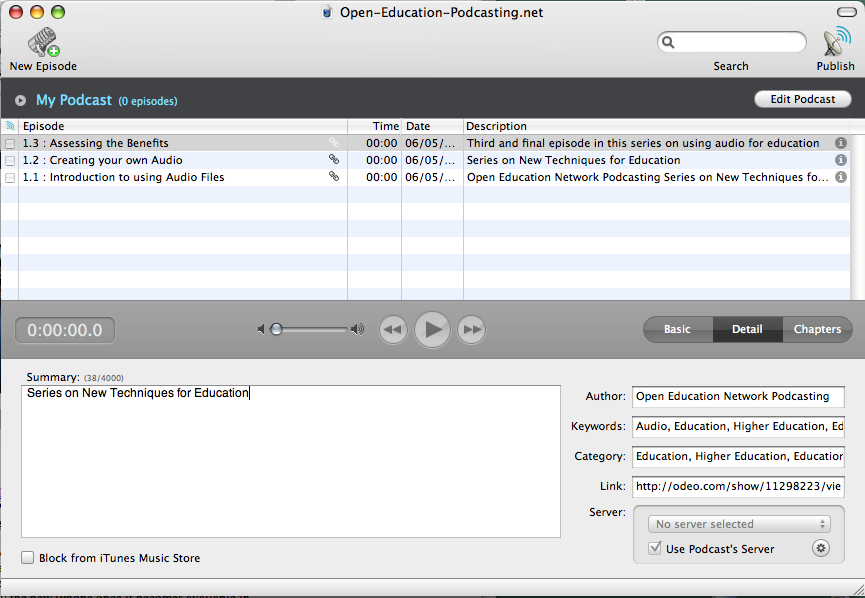
A short report on 'Podcast Maker' by LemonzDream -
This works like a dream with instant upload to a .Mac account.

You can see here the resulting uploaded podcasts.

Not only this, they have a Jin Kim on their customer support staff who emailed back to me within minutes - incredibly prompt service, and so polite manner. One benefit in online education is that I don't know whether this is a beautiful young blond or a doddering old baldy - Don't know and Don't care, but "Thank you, Jin Kim, for your kind help".

Coming up next is my report on Podomatic ...
All Best Wishes
Paul

21 April 2007

mp3, to wav, to vox, to ...

Hi Folks,
It's hard not to sing the praises of Mac.
Use ask.com to write your question in easy plain English, for example here "How to make an mp3 file on a Mac?", thus ;
And go to the top first hit to free Switch software at http://www.nch.com.au/switch
And then download install the free software to convert any sound-file to any other.

After you have downloaded this, click on Switch to open it and browse to your file, for example my AudioIntro.mp3 used earlier in my posting 'Audio Blogging' on 13 April 2007. Then using the Mac Timed-Screen-Grab, I can show you the drop-down menu of the full range of audio formats available as output format …

and convert my AudioIntro.mp3 into AudioIntro.wav, and/or viceversa.

Actually with a Mac, you don’t need this conversion software. To change a file format, you can just go to whatever.gif and click its name and retype it as whatever.jpg, or taking a few seconds longer click open what.gif and save-as what.jpg (when Mac says ‘Do you really want to use jpg or keep gif, just click ‘use jpg’. Same with mpg to wmv, and same with mp3 / wav / vox /whatever you like.
All Best Wishes
Paul